
Resin Documentationhome company docs
app server 
app server
virtual hosting
Each Resin instance can serve many virtual hosts. The virtual host will have its own servlets and documents. For greater isolation, you can configure each virtual host to have its own JVM and you can have all the virtual hosts controlled by a single web server. A "virtual host" has a unique , but the same as other domain names. For example, In this scenario, both www.gryffindor.com and www.slytherin.com are
registered with the standard domain name service registry as having the IP
address  Note IIS, just to be different, uses the term "virtual sites" instead of "virtual hosts".Testing virtual hostsDuring development and testing, it is often inconvenient or impossible to use real virtual host names that are registered as internet sites, and resolve to an internet-available IP address. OS-level features on the test client machine can be used to map a virtual host name to an IP address. For example, developers often run the Resin server and the test client (usually a browser) on the same machine. The OS is configured to map the "www.gryffindor.com" and "www.slytherin.com" names to "127.0.0.1", pointing these host names back to computer that the client is running on. Unix user's edit the file /etc/hosts 127.0.0.1 localhost 127.0.0.1 www.gryffindor.com 127.0.0.1 www.slytherin.com Windows user edit the file C:\WINDOWS\SYSTEM32\DRIVERS\ETC\HOSTS 127.0.0.1 localhost 127.0.0.1 www.gryffindor.com 127.0.0.1 www.slytherin.com Configuring the standalone server is the easiest and best way of testing a virtual host configuration. The resin.conf is identical for Resin standalone and for Resin as a servlet runner. So even when using an external web server like Apache or IIS, it's a good idea to test configuring with Resin standalone. Each virtual host has its own host block. At the very least, each host will define the specifying the host name and a root web-app. A <root-directory> is often used to provide a host specific root for logfiles. The following sample configuration defines two virtual hosts, gryffindor and slytherin, each with its own document directory. resin.conf
<resin xmlns="http://caucho.com/ns/resin">
<cluster id="app-tier">
  <server id="app-a" .../>

  <host-default>
    <web-app-deploy path="webapps"/>
  </host-default>

  <host id="gryffindor.caucho.com">

    <root-directory>/vfs/www/gryffindor</root-directory>

  </host>

  <host id="slytherin.caucho.com">

    <root-directory>/vfs/www/slytherin</root-directory>

  </host>

</cluster>
</resin>
Browsing http://gryffindor.caucho.com/test.jsp will look for /vfs/www/gryffindor/webapps/ROOT/test.jsp. Browsing http://slytherin.caucho.com/test.jsp will look for /vfs/www/slytherin/webapps/ROOT/test.jsp. Resin can be configured to deploy virtual hosts dynamically. Instead
of adding a <host> tag to <host-deploy> is used in host-deploy dynamic virtual hosts
<resin xmlns="http://caucho.com/ns/resin">
  <cluster id="app-tier">
    <server id="app-a" .../>

    <host-deploy path="hosts">
      <host-default>
        <class-loader>
          <compiling-loader path='classes'/>
          <library-loader path='lib'/>
        </class-loader>

        <web-app-deploy path='webapps'/>
      </host-default>
    </host-deploy>
  </cluster>
</resin>
Any directory created in $SERVER_ROOT/hosts/www.gryffindor.com/ $SERVER_ROOT/hosts/www.gryffindor.com/webapps/ROOT/index.jsp $SERVER_ROOT/hosts/www.gryffindor.com/webapps/foo/index.jsp $SERVER_ROOT/hosts/www.slytherin.com.jar Jar libraries and class files that are shared amongst all webapps in the host
can be placed in $SERVER_ROOT/hosts/www.gryffindor.com/lib/mysql-connector-java-3.1.0-alpha-bin.jar $SERVER_ROOT/hosts/www.gryffindor.com/classes/example/CustomAuthenticator.java More information is available in the configuration documentation for <host-deploy> and <host-default>. In some ISP setups, it may make sense to assign a JVM for each virtual host. The isolation of web-apps may not be sufficient; each host needs a separate JVM. In this configuration, each JVM needs its own srun-port and possibly its own srun-host. The setup is similar to load-balancing. A front-end web server receives all requests, and is configured to dispath to back-end Resin JVM's that correspond to the host name. 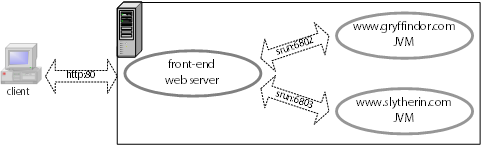 Back-end JVM'sIn the most straightforward configuration, each host specific backend JVM gets its own resin.conf. The resin.conf can use resin:include to share common configuration. In this example, the virtual hosts $RESIN_HOME/conf/resin.conf
<resin xmlns="http://caucho.com/ns/resin">

  <cluster id="gryffindor>
    <server id="gryffindor" host="localhost" port="6802"/>

    <host id="www.gryffindor.com">

      <root-directory>/home/www/gryffindor</root-directory>

    </host>
  </cluster>

  <cluster id="slytherin">
    <server id="slytherin" host="localhost" port="6803"/>

    <host id="www.slytherin.com">

      <root-directory>/home/www/slytherin</root-directory>

    </host>
  </cluster>

</resin>
Each back-end JVM is started separately: unix> java -jar lib/resin.jar -server gryffindor start unix> java -jar lib/resin.jar -server slytherin start unix> java -jar lib/resin.jar -server gryffindor stop unix> java -jar lib/resin.jar -server slytherin stop Resin front-endThe host-specific back-end JVM's are ready to receive requests on their srun ports. A third instance of Resin in a separate JVM can be used as the front-end server. It receives all requests and dispatches to the back-end servers. 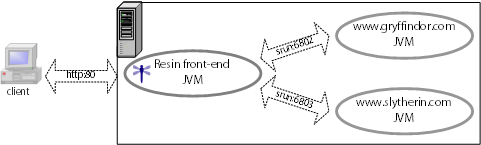 The Resin web server is configured using the LoadBalanceServlet to dispatch to the back-end JVM's. A cluster is defined for each back-end JVM, so that the LoadBalanceServlet knows how to find them. $RESIN_HOME/conf/resin.conf for front-end web server
<resin xmlns="http://caucho.com/ns/resin">
  <cluster id="web-tier">
    <server-default>
      <http port="80"/>
    </server-default>

    <server id="web-a" address="192.168.2.1"/>

    <host id="gryffindor.com">
      <web-app id="/">

        <rewrite-dispatch>
          <load-balance regexp="" cluster="gryffindor"/>
        <rewrite-dispatch>

      </web-app>
    </host>

    <host id="slytherin.com">
      <web-app id="/">

        <rewrite-dispatch>
          <load-balance regexp="" cluster="slytherin"/>
        <rewrite-dispatch>

      </web-app>
    </host>
  </cluster>

  <cluster id="gryffindor">
    <server id="gryffindor" address="localhost" port="6802"/>

    ...
  </cluster>

  <cluster id="slytherin">
    <server id="slytherin" address="localhost" port="6803"/>

    ...
  </cluster>
</resin>
Starting the servers on UnixThe front-end server JVM is started similar to the back-end JVM's: unix> bin/httpd.sh -server resin -conf conf/resin.conf start ... unix> bin/httpd.sh -server resin -conf conf/resin.conf stop A script that handles the syntax for all three is convenient, and provides the opportunity to automate more sophisticated startup: local-httpd.sh
#!/bin/sh

allservers="gryffindor slytherin resin"

# customize args as needed, for example:
# args="-server -Xmn20M -Xms100M -Xmx100M"
args=""

usage="
Script that starts Resin for a server.
The stdout and stderr are redirected to server specific files.
The script assumes that RESIN_HOME has been set, or if it is not set that
it has been started from what RESIN_HOME would be.

USAGE:

$0 [OPTION] {server-id} start [RESINOPTIONS]
$0 [OPTION] {server-id} stop [RESINOPTIONS]
  Start or stop the server with the passed server-id

$0 [OPTION] all start [RESINOPTIONS]
$0 [OPTION] all stop [RESINOPTIONS]
  Start or stop all of the servers ($allservers)

OPTION:
    --debug   pass options to Resin that allow a debugger to attach
"

# find RESIN_HOME

if test "$RESIN_HOME"; then
  cd "$RESIN_HOME"
fi

dbgport=""

# check for extended command line options
while [ $1 ]; do
  case "$1" in
    --h*) # --help
      shift;
      echo "$usage" >&2
      exit 0
      ;;
    --d*) # --debug
      dbgport="5432"
      shift;
      ;;
    --*)
      echo "$0: invalid option $1, try --help" >&2
      exit 9
      ;;

    *) break ;;
  esac
done

# get the id of the server to start

id="$1"
if test -z "$id"; then
  echo "$usage" >&2
  exit 9
fi
shift

# handle special case of id `all'

if test "$id" = "all"; then
  id="$allservers"
fi


# start the server

for i in $id; do
  echo "$i $@"

  if test "$dbgport"; then
    dbgargs="-Xdebug -Xrunjdwp:transport=dt_socket,server=y,suspend=n,address=$dbgport"
    echo "debugger can attach to server $i on port $dbgport"
    dbgport=`expr $dbgport + 1`
  fi

  serverargs="-server $i -conf conf/$i.conf -pid $i.pid"
  logargs="-stderr log/$i-stderr.log log -stdout log/$i-stdout.log"

  echo bin/httpd.sh $serverargs $logargs $dbgargs $args $@
done
Using local-httpd.sh unix> ./local-server.sh all start ... unix> ./local-server.sh all stop unix> ./local-server.sh --debug gryffindor start unix> ./local-server.sh --debug slytherin start unix> ./local-server.sh resin start ... unix> ./local-server.sh all stop Starting the server's on WindowsWith Windows, each JVM is installed as a service. win> bin/httpd -install-as "Resin" -server resin -conf conf/resin.conf -Xrs win> bin/httpd -install-as "Resin www.gryffindor.com" -server gryffindor -conf conf/gryffindor.conf -Xrs win> bin/httpd -install-as "Resin www.slytherin.com"-server slytherin -conf conf/slytherin.conf -Xrs You will either need to reboot the machine or start the service from the Control Panel/Services panel to start the server. On a machine reboot, NT will automatically start the service. There is a bug in many JDKs which cause the JDK to exit when the administrator logs out. JDK 1.4 and later can avoid that bug if the JDK is started with -Xrs. Apache front-endThe host-specific back-end JVM's are ready to receive requests on their srun ports. Apache is the front-end server, and is configured to dispatch to the appropriate back-end Resin JVM for the host: 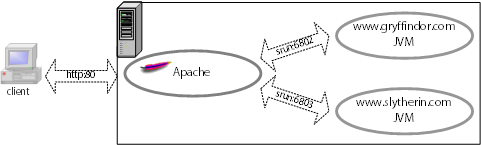 httpd.conf <VirtualHost 127.0.0.1> ServerName gryffindor.caucho.com ResinConfigServer 192.168.0.10 6802 </VirtualHost> <VirtualHost 192.168.0.1> ServerName slytherin.caucho.com ResinConfigServer 192.168.0.11 6802 </VirtualHost> When you restart the Apache web server, you can look at and to check your configuration. Check that each virtual host is using the and that you expect. While Resin's virtual hosting is primarily aimed at named-based virtual hosts, it's possible to run Resin with IP-Based virtual hosts. With IP virtual hosting, each <http> block is configured with the virtual host name. This configuration will override any virtual host supplied by the browser.
<resin xmlns="http://caucho.com/ns/resin">

<cluster id="web-tier">
  <server id="a">

    <http address="192.168.0.1" port="80"
          virtual-host="slytherin.caucho.com"/>

    <http address="192.168.0.2" port="80"
          virtual-host="gryffindor.caucho.com"/>

  </server>

  ...

  <host id="slytherin.caucho.com">
    ...
  </host>
</cluster>
</resin>
Resin's virtual hosting understands host names encoded using rfc3490 (Internationalizing Domain Names in Applications). This support should be transparent. Just specify the virtual host as usual, and Resin will translate the brower's encoded host name the unicode string. Support, of course, depends on the browser. Mozilla 1.4 supports the encoding. A common configuration uses virtual hosts with Apache or IIS. As usual, Apache or IIS will pass matching requests to Resin. ApacheThe Resin JVM configuration with Apache is identical to the standalone configuration. That similarity makes it easy to debug the Apache configuration by retreating to Resin standalone if needed. The directive in Apache is vital to make Resin's virtual hosting work. When Apache passes the request to Resin, it tells Resin the . Without the , Resin can get very confused which host to serve. httpd.conf LoadModule caucho_module /usr/local/apache/libexec/mod_caucho.so ResinConfigServer localhost 6802 <VirtualHost 127.0.0.1> ServerName gryffindor.caucho.com </VirtualHost> <VirtualHost 192.168.0.1> ServerName slytherin.caucho.com </VirtualHost> Note You'll the LoadModule must appear before
the ResinConfigServer for Apache to properly understand the
ResinConfigServer command. If they're missing, Apache will send
an error.IISConfiguration and installation for IIS virtual sites is discussed in the IIS installation section.
|